
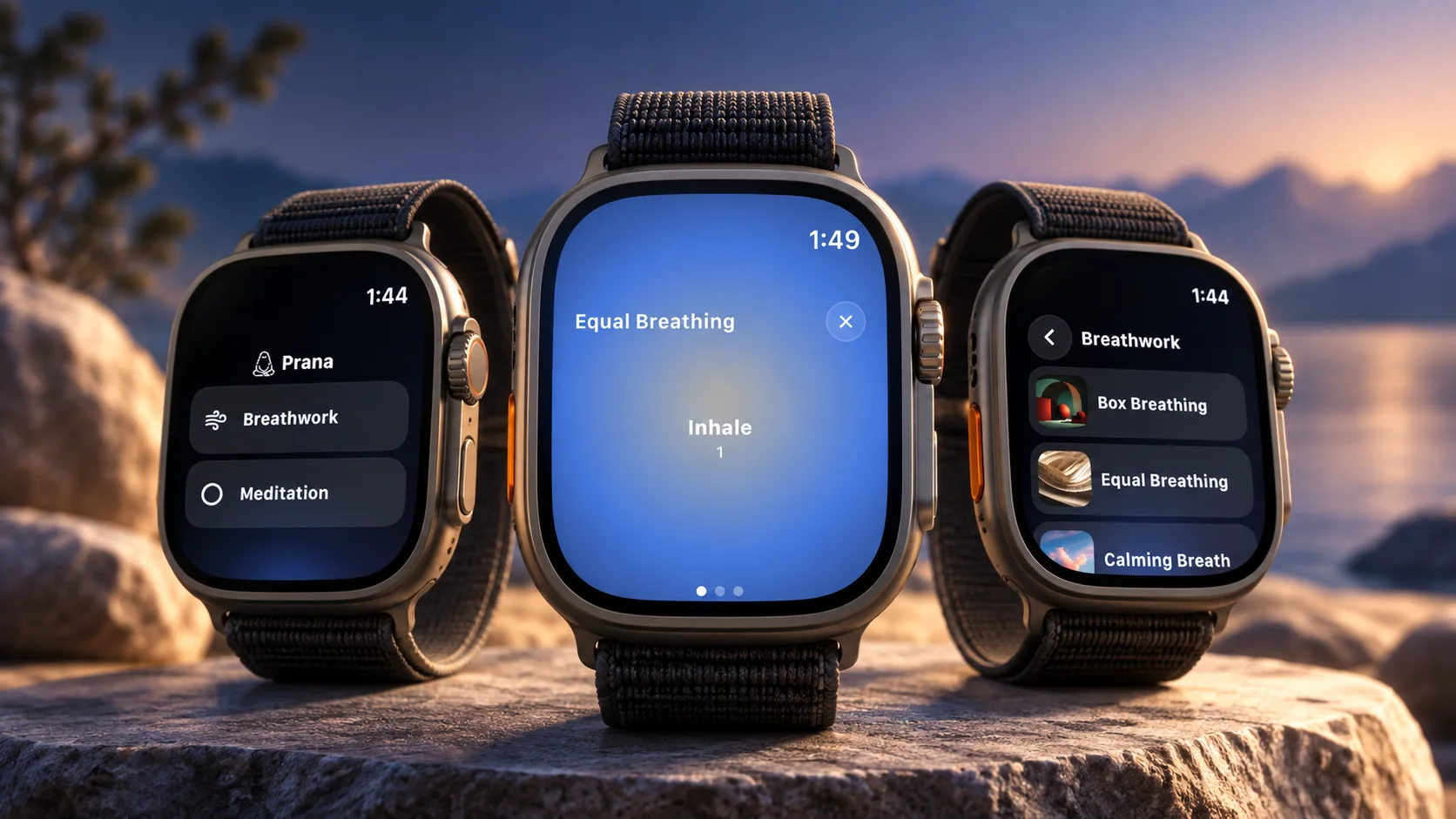
Does Prana have an Apple Watch app?
Yes. Prana includes a free Apple Watch companion app. With a paired iPhone and Prana installed on the watch, you can start selected guided breathing practices and open or timed meditation sessions from your wrist.
The Watch experience is intentionally focused: visual and haptic pacing, simple controls, optional heart-rate context when readings are available, and a completed session that syncs back to Prana on iPhone. All current Apple Watch features are free, with no separate Watch purchase, subscription, or feature unlock. It is not a replacement for the full iPhone app or a medical-monitoring tool.
Why breathwork belongs on your wrist
A breathing practice often begins in the in-between moments: before a meeting, on a walk, after a difficult conversation, or when the day has quietly become too loud. Reaching for a phone can add one more step at exactly the moment you want fewer.
That is why we built Prana for Apple Watch. Not to shrink every part of the iPhone app onto a wrist, but to make the beginning of a practice more immediate. Open Prana, choose a breath or a timer, and let the watch carry the next few minutes.
What you can do with Prana on Apple Watch
- Guided breathwork
- Box Breathing, Equal Breathing, Calming Breath, and Sleep Reset in 1-, 3-, or 5-minute sessions.
- Meditation timers
- Open-ended practice or a timer from 1 to 60 minutes.
- Guidance
- On-screen pacing, gentle haptic cues, and pause, resume, or end controls.
- Health and history
- Optional heart-rate context, iPhone history sync, and Apple Health Mindful Minutes when enabled.
Prana on Apple Watch has two simple starting points: Breathwork and Meditation. Breathwork includes four guided patterns—Box Breathing, Equal Breathing, Calming Breath, and Sleep Reset—with a choice of 1, 3, or 5 minutes. Meditation can be open-ended or timed, from one minute to an hour.
Each breathing practice uses an on-screen guide and gentle haptic cues for the inhale, hold, and exhale phases. A short countdown leaves a little space to arrive. Once a session has begun, you can pause, resume, or end it from the watch.
Built for the wrist, not copied from the phone
The Watch app is intentionally selective. It does not try to be the whole Prana library, a custom session builder, or an audio player. It is a quiet, practical starting place for the practices that make sense in a short moment, with your attention still on the breath instead of the interface.
No separate Watch purchase
All current Prana Apple Watch features are free to use. There is no separate Apple Watch purchase, subscription, or feature unlock for Watch-started sessions, haptic guidance, heart-rate context, or sync to iPhone.
Optional heart-rate context, with the right boundaries
When you choose to grant the relevant Apple Health permission, Prana can show available heart-rate samples during a compatible Watch session. At the end, you may see a simple session view with average and maximum heart rate and a chart of the readings that were captured.
Those readings are optional wellness context—not a diagnosis, a stress score, or a reason to make a treatment decision. Apple lets you review and change an app's Health permissions at any time in the Health app and Apple Watch settings. A reading is not guaranteed in every session.
Prana does not save a Watch session as an Apple Watch workout or affect Activity rings. The goal is simply to give you a little context, if you want it, without turning a breathing practice into a performance test.
A gentle suggestion, never an alert
With permission to access the relevant Apple Health event, Prana can offer a one-minute Box Breathing suggestion after a recent high-heart-rate event. You can take the pause or dismiss it. It is not an emergency feature, a health alert, or continuous monitoring; for symptoms or a health concern, seek appropriate medical care.
How Apple Watch sessions sync with iPhone
Prana is an Apple Watch companion app, which means you install it through the paired iPhone app. You do not need to keep your phone open to start or finish a supported Watch practice, but the iPhone remains the home for the complete Prana library, settings, and practice history.
When a Watch-started session ends, Prana queues the session details for the paired iPhone. Once the devices connect, it can appear in your history and progress. If you have separately enabled Apple Health sync, the iPhone app can save the completed session as a Mindful Minute. Sync can take a little time when the devices are not connected, so we do not promise an instant handoff.
iPhone sessions still meet you on the watch
The integration also works in the other direction. When you start a compatible breathwork or meditation session on iPhone with Watch heart-rate access enabled, the Watch companion can mirror the session timer and offer pause, resume, and end controls. It is one practice across two screens, with each screen doing the job it is best at.
How to get started
Update Prana on iPhone, make sure your Apple Watch is paired, and install Prana from the Watch app on iPhone. Then open Prana on the watch and choose Breathwork or Meditation. All current Watch features are included at no extra charge. Heart-rate and Apple Health features are optional, and you can use the Watch app without granting them.
- Set up Prana on Apple Watch
A step-by-step installation and session guide.
- Understand Apple Watch heart-rate context
Learn what heart-rate context can show and where its limits are.
- Read the Apple Watch breathwork app guide
A clear comparison of built-in Apple Mindfulness and dedicated breathwork practice.
FAQ
Does Prana have an Apple Watch app?
Yes. Prana has a free Apple Watch companion app. With a paired iPhone and Prana installed on the watch, you can start selected breathwork sessions and meditation timers from your wrist.
Are Prana Apple Watch features free?
Yes. All current Apple Watch features are free. Prana does not charge separately for the Apple Watch companion app, Watch-started sessions, haptic guidance, heart-rate context, or session sync.
Can I use Prana on Apple Watch without opening my phone?
You can start and complete a supported Watch session without keeping the phone open. Prana is still installed and connected as a companion to the paired iPhone, which receives your synced session history.
Which breathing exercises are on Prana for Apple Watch?
Prana on Apple Watch includes Box Breathing, Equal Breathing, Calming Breath, and Sleep Reset, each in 1-, 3-, or 5-minute sessions.
Does Prana use Apple Watch heart rate?
With your permission, Prana can display available heart-rate context during a compatible Watch session and in its session summary. It is optional wellness context, not medical monitoring or advice.
Do Apple Watch sessions count in Prana and Apple Health?
After a Watch-started session syncs to iPhone, it can be added to your Prana history and progress. If Apple Health sync is separately enabled, Prana can save it as a Mindful Minute.
Take your next breath from your wrist
Prana on Apple Watch is ready when a one-minute pause is all the time you have. Start with the app you already use on iPhone, then let the watch make the first step lighter.
Download Prana